Android
- Minimum OS: Android 8.0 (Oreo) or higher
- Browser: Chrome 90+ recommended
- Shortcut: via Chrome Add to Home Screen option
Mafia Casino on Mobile
The full casino and sportsbook in your mobile browser, with no download needed. Save the shortcut to your home screen for one-tap access to thousands of games, AUD deposits from $20 and live betting.
How to Add the Mafia Casino Shortcut
The Mafia Casino Lobby on Your Phone
The full casino and sportsbook in your mobile browser, with no download needed. Save the shortcut to your home screen for one-tap access to thousands of games, AUD deposits from $20 and live betting.
Play on Your Phone 18+ only. Gambling can be addictive, so play responsibly. Bonus terms and wagering requirements apply.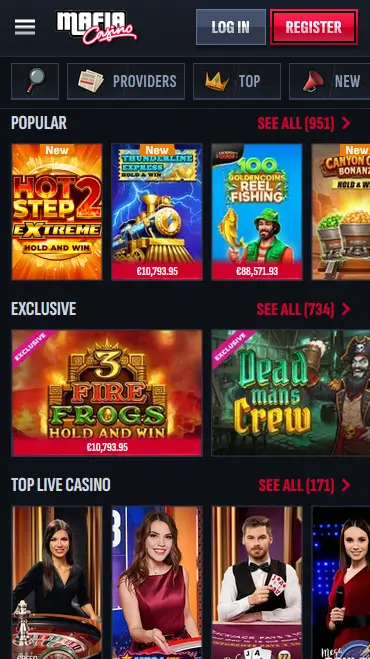
Staying Secure on Mobile
What You Should Do
What You Should Avoid
Mobile Experience: Strengths and Limitations
Pros
Cons
Device Compatibility at a Glance
Android
iOS
What the Mobile Experience Delivers
Full Catalogue on Any Screen
The Popular, Exclusive and Top Live Casino rows, the live dealer tables and the integrated sportsbook are all accessible through the mobile browser without a separate app download.
Same Cashier as Desktop
The mobile cashier supports Pay by Card, NTLR, Mifinity, USDT, Bitcoin, Bitcoin Cash, Ethereum and Litecoin from $20, in Australian dollars.
Biometric Sign-In
On supported Android and iOS devices, fingerprint and Face ID authentication can replace password entry after your first manual sign-in.
Mafia Casino’s entire bonus programme is accessible from the mobile browser, with no reduction in offers compared to the desktop site. The Casino Welcome Bonus of 100% up to $750 plus 200 free spins is claimable on mobile from the banner at the top of the registration form, and no promo code is needed. The sports First Deposit Bonus (100% up to $150), the Weekly Reload and the Weekend Reload Bonus ($1,050 plus 50 free spins) are credited in the same way as on desktop. 18+. Wagering requirements apply. The full bonus terms are worth reviewing before claiming any offer on mobile, particularly the validity window for free spins and the per-spin limit while wagering through a bonus balance.
Every connection between the Mafia Casino mobile site and the server runs over 256-bit SSL encryption, identical to the standard used by major Australian banks. This applies whether you are browsing the pokies lobby, placing an In Play bet or entering payment details in the mobile cashier. The encryption layer is active from the moment the browser connects to mafiacasino24.com.
Two-factor authentication is available from the account settings page and works identically on mobile and desktop. Once enabled, a six-digit one-time code is required at each sign-in, delivered via an authenticator app or SMS to your registered number. Even if a password is compromised, a second device or physical access to your phone is required to complete authentication.
On Android devices running Android 8.0 or higher, Chrome supports fingerprint sign-in via the device’s biometric sensor. On iPhone and iPad running iOS 14 or higher, Face ID and Touch ID are available in Safari. After the first successful manual login, the browser typically offers to use biometrics for subsequent sessions, cutting the sign-in process to a single touch or glance.
The Mafia Casino mobile experience covers every section available on the desktop platform. The lobby opens with the Popular row (951 titles), the Exclusive row (734 titles) and Top Live Casino (171 titles), with Providers, Top and New shortcuts along the top for filtering. Hold and Win pokies such as Hot Step 2 Extreme, Thunderline Express, 100 Gold Coins Reel Fishing and 3 Fire Frogs sit beside live tables with dealer streams sized for a phone screen. The sportsbook presents football, tennis, cricket, rugby league and more with a touch-friendly bet slip.
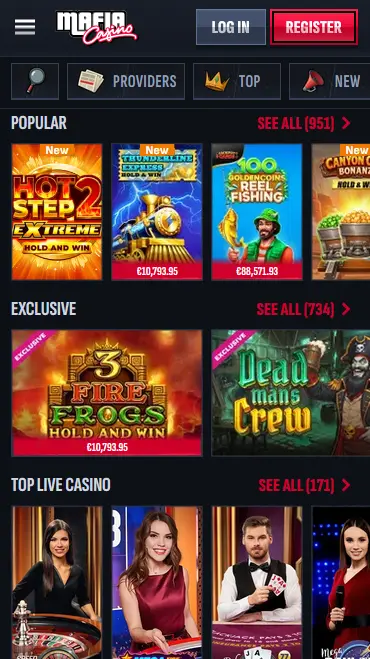
The mobile browser version renders the same content as the desktop site, with the layout adapted for portrait and landscape screens. The main difference is navigation: the menu opens from a hamburger icon in the top left corner instead of a persistent sidebar, and Log In and Register stay fixed at the top of the screen. There is no functionality gap between the two access methods; the cashier, account settings, VIP Levels and bonus tracking are all present in the mobile layout.
Mafia Casino functions on Android devices running Android 8.0 (Oreo) or higher. Chrome version 90 or above is the recommended browser, as it supports the full range of HTML5 game features used by studios such as Pragmatic Play and Playtech. Devices with less than 2 GB of RAM may experience slower load times on high-frame-rate live dealer streams.
iPhone and iPad users on iOS 14 or higher can access the full platform through Safari. The Add to Home Screen option is available exclusively through Safari on iOS; third-party browsers on iPhone do not currently support this function. Face ID authentication on Face ID-capable iPhones and Touch ID on older models both work within the Safari browser session.
| Platform | Minimum OS | Recommended Browser | Home-Screen Shortcut |
|---|---|---|---|
| Android | 8.0 (Oreo) | Chrome 90+ | Yes (Chrome) |
| iOS | 14.0 | Safari | Yes (Safari only) |
The full payment menu is available in the mobile cashier, including Pay by Card (Visa and Mastercard), NTLR, Mifinity and the crypto options: USDT on the ERC20, TRC20, BEP20 and Solana networks, Bitcoin, Bitcoin Cash, Ethereum and Litecoin. Crypto deposits generate a wallet address within the cashier for you to send to, and card deposits are entered directly in the cashier form.
| Method | Deposit range | Deposit | Withdrawal |
|---|---|---|---|
| Pay by Card | $20 to $3,100 | Instant | 1-5 business days |
| NTLR | $20 to $8,100 | Instant | Shown in cashier |
| Mifinity | $20 to $4,000 | Instant | Shown in cashier |
| USDT (all networks) | $20 to $8,100 | Instant | 1-12 hours |
| Bitcoin | $45 to $7,800 | Instant | 1-12 hours |
| Ethereum / Litecoin / Bitcoin Cash | $20 to $8,100 | Instant | 1-12 hours |
The mobile cashier displays your balance in Australian dollars throughout.
Payment details entered in the mobile cashier are transmitted through the same 256-bit SSL channel as the rest of the site. The casino does not store full card numbers on its servers. Crypto payments never expose your bank account, since you send funds from your own wallet to the address shown in the cashier.
The whole catalogue is available in the mobile browser without any reduction in size. New and exclusive releases such as Thunder Step 2, Fire Diamond, Silly Chili Dogs, 3 Volcano Power and Epic Zeus load in portrait layout, and Pragmatic Play’s Gates of Olympus 1000 stays in the Top games row. Hold and Win titles run smoothly on entry-level smartphones given their relatively low graphical demand.
The Top Live Casino row streams from studio in HD, with adaptive bitrate reducing quality automatically if your connection drops below a stable threshold. Speed Roulette, Mega Roulette and Ruby Blackjack are headline mobile live tables, and the game show shelf adds Money Time, Gravity Wheel and Candy Wheel with a simplified betting interface for touchscreen play.
RNG versions of blackjack, roulette and baccarat load in the mobile browser from the table games section. These titles run at lower bandwidth than live streams, making them a practical option on a mobile data connection rather than Wi-Fi.
The Hot Jackpots shelf lists pokies with live prize counters on their tiles, such as Piggy Bankroll Vault Smash and 3 Fire Frogs, and the counters update in real time in the mobile lobby. Jackpot rounds are triggered within the game itself on any qualifying spin.
Open Chrome on your Android device and go to mafiacasino24.com. Allow the page to load fully. Tap the three-dot overflow menu at the top right of Chrome, then tap Add to Home Screen. Confirm the name and tap Add. The Mafia Casino icon appears on your home screen, and tapping it launches the platform in a standalone window.
Open Safari on your iPhone or iPad and go to mafiacasino24.com. Wait for the page to load completely. Tap the Share icon (a square with an arrow pointing upward) in the Safari toolbar. Scroll through the share sheet and tap Add to Home Screen. Confirm the name and tap Add in the upper right corner. The icon now sits on your home screen and opens the mobile site in a clean, app-like presentation.
Both sets of steps create a Progressive Web App (PWA) shortcut. Unlike a native app, the shortcut does not require approval from the Google Play Store or Apple App Store. It is not an APK file and does not require the allow unknown sources setting to be enabled. The shortcut always serves the current version of the site, so there are no manual updates to manage.
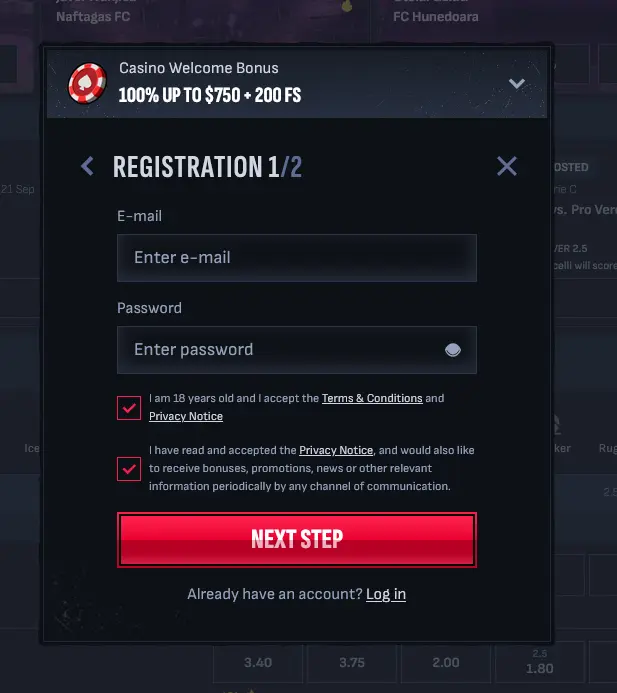
New players can register directly in the mobile browser. Tap Register at the top of the screen, enter your email address and password, tick the boxes confirming you are 18 or over and accept the Terms and Conditions and the Privacy Notice, then tap Next Step to complete step two of two. The Casino Welcome Bonus banner sits at the top of the form throughout. The minimum age for account registration is 18.
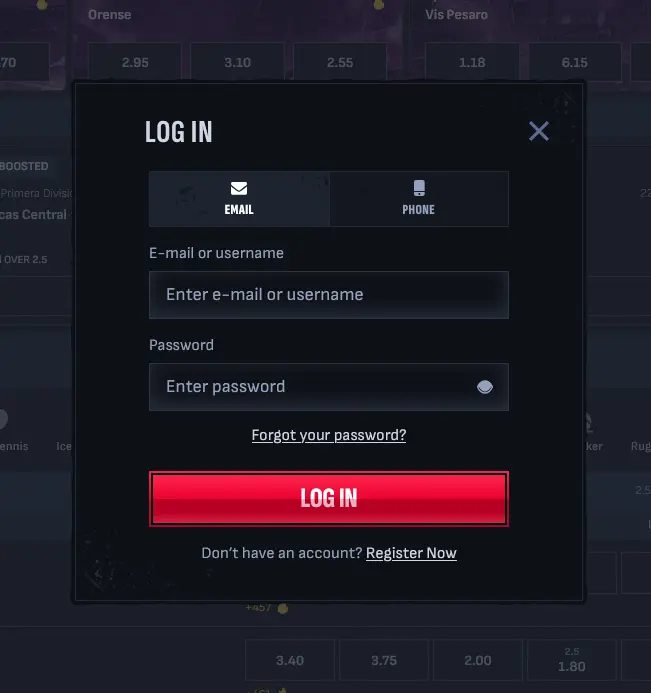
Tap Log In and choose the Email tab (email or username plus password) or the Phone tab. After the first successful manual sign-in, most mobile browsers offer to save the credentials or use biometric authentication for future sessions. For guidance on sign-in troubleshooting, see the login page.
Live chat is accessible from the mobile site, and the Help Centre button gives you answers on common questions. Connecting to an agent typically takes only a couple of minutes at any hour. Email support is available at [email protected] for less urgent matters. Both channels are staffed 24/7 with coverage spanning AEST and AEDT.
Deposit limits, loss limits, session time alerts and self-exclusion are all accessible from the account settings in the mobile browser. These tools function identically on mobile and desktop. If you are concerned about your gambling, the responsible gaming section of your account settings gives you direct access to limit controls without needing to contact support. You can also contact the support team at [email protected] at any time.
Mobile and App Questions
No native app is currently listed on Google Play or the Apple App Store. Mafia Casino is accessed through the mobile browser at mafiacasino24.com, and a home-screen shortcut can be added on both Android and iOS for quick access.
The full platform is available on mobile, including the sportsbook with football, tennis, cricket and rugby league, In Play betting, the live dealer tables and the complete pokies catalogue.
Android 8.0 (Oreo) or higher with Chrome 90+ is recommended, and iOS 14 or higher with Safari is the recommended configuration for iPhone and iPad users who want to add the home-screen shortcut.
Play on Your Phone Now
Claim 100% up to $750 plus 200 free spins on your first deposit.
Enter the Casino 18+ only. Gambling can be addictive, so play responsibly. Bonus terms and wagering requirements apply.